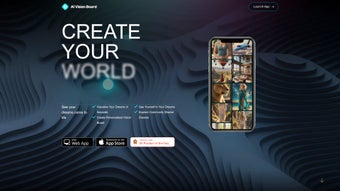

Download AI VisionBoard – AI‑powered Dream Visualization Tool
Overview
AI VisionBoard is a web‑based artificial intelligence platform that turns abstract aspirations into vivid, shareable visual boards. By typing a simple description of a goal—whether it’s launching a startup, buying a home, or improving personal wellness—the engine instantly generates high‑resolution images, collages, and motivational quotes that embody the user’s intent. What sets AI VisionBoard apart is its blend of visual creativity, an AI‑driven Life Coach, and a thriving community hub, all wrapped in a secure, free‑to‑start web app.
The tool supports personal photo uploads, allowing users to blend their own memories with AI‑generated art, making each board uniquely theirs. In addition, the AI Life Coach offers personalized recommendations, habit‑tracking tips, and growth‑focused exercises, turning the board from a static poster into an interactive roadmap. Whether you’re a student planning your career, an entrepreneur mapping milestones, or anyone seeking a visual reminder of their dreams, AI VisionBoard provides a seamless, inspiring experience that encourages consistent action and community support.
Beyond simple visualization, AI VisionBoard acts as a strategic planning companion. Users can attach deadlines, break down large objectives into bite‑size tasks, and link resources such as articles, videos, or podcasts directly to board elements. The platform’s analytics engine tracks interaction frequency, offering insights into which visual cues motivate you most.
This data‑driven feedback loop helps refine future boards, ensuring that each iteration becomes more aligned with personal growth patterns. Moreover, the community aspect fosters peer accountability; members can join themed groups—like “Fitness Goals 2025” or “Startup Launchpad”—share progress updates, and celebrate milestones together. By integrating AI creativity with practical goal‑management tools, AI VisionBoard bridges the gap between imagination and execution, making the journey toward any aspiration both enjoyable and measurable.
Key Features & AI Life Coach
- Instant AI‑generated visuals based on natural‑language goal input.
- Custom photo integration for personal touch and authenticity.
- AI Life Coach delivering tailored advice, habit suggestions, and progress tracking.
- Community board where users can share, comment, and collaborate on vision ideas.
- Drag‑and‑drop editor for arranging images, text, and widgets.
- Export options: PDF, PNG, or shareable link for social media.
- Secure cloud storage with automatic backups.
- Regular updates with new AI models and design templates.
The visual generation engine leverages state‑of‑the‑art diffusion models, ensuring each board is not only aesthetically pleasing but also contextually relevant to the user’s input. For example, entering “run a marathon in 2025” yields a dynamic collage of race tracks, training gear, and inspirational milestones, all in a style you can fine‑tune. The AI Life Coach works hand‑in‑hand with the board, suggesting daily affirmations, weekly check‑ins, and resource links that align with the visual narrative. This integrated approach keeps motivation high and reduces the friction often associated with goal‑setting. Moreover, the community feature fosters accountability; users can follow peers with similar ambitions, exchange feedback, and celebrate achievements, turning solitary dreaming into a collaborative journey.
Each feature is designed with scalability in mind. The drag‑and‑drop editor supports multiple layers, allowing users to create complex storyboards that evolve over time. Export options give you the freedom to print large‑format posters for office walls or share compact links on social platforms, preserving visual fidelity across devices.
Secure cloud storage means your boards are automatically saved every few seconds, protecting against accidental loss and enabling seamless sync across desktop, tablet, or phone. Regular updates introduce fresh design templates, seasonal themes, and the latest AI model improvements, ensuring the tool stays at the cutting edge of visual AI technology. Together, these capabilities form a comprehensive ecosystem that nurtures creativity while delivering actionable insights.
Installation, Usage & Compatibility
Getting Started – No Download Required
AI VisionBoard is a fully web‑based solution, meaning there is no traditional installer for Windows, macOS, Android, or iOS. To begin, simply navigate to aivisionboard.com and click the “Create Your Board” button. The site employs HTTPS encryption, guaranteeing that all data—personal photos, goal statements, and coaching insights—are transmitted securely. Upon first launch, users are prompted to create a free account using an email address or single‑sign‑on via Google or Apple ID. This account stores boards in the cloud, allowing access from any device with a modern browser (Chrome, Edge, Safari, or Firefox).
Account creation also includes optional two‑factor authentication (2FA) for users who prioritize maximum security. Once logged in, a quick onboarding tour highlights key UI elements, explains how to invoke the AI Life Coach, and demonstrates board sharing settings. Users can immediately start a new board or explore community‑generated templates for inspiration. Because everything runs in the browser, updates are instantaneous—no manual patching or version checks are required.
Step‑by‑Step Usage Guide
- Sign Up / Log In: Register with an email or use SSO; verify your email to unlock full features.
- Enter Your Dream: Type a concise description of your goal. The AI parses keywords and context to generate visuals.
- Customize the Board: Drag generated images onto the canvas, upload personal photos, add text blocks, or select from pre‑made templates.
- Activate the AI Life Coach: Click the “Coach” tab; answer a few lifestyle questions; receive a personalized action plan.
- Share or Export: Use the “Share” button for a public link, or download a high‑resolution PDF/PNG for printing.
- Engage with Community: Post your board to the community feed, comment on others, and join goal‑focused groups.
- Adjust Settings: Navigate to the profile area to manage privacy, notification preferences, and subscription options.
- Track Progress: Use the built‑in analytics dashboard to see how often you interact with each board element and receive AI‑suggested adjustments.
Device Compatibility (itemprop="operatingSystem")
Because AI VisionBoard runs entirely in the browser, it is compatible with all major operating systems:
- Windows 10 and later (Chrome, Edge, Firefox, Safari)
- macOS Catalina and later (Safari, Chrome, Firefox)
- Linux distributions with a modern browser
- Android 8.0+ (Chrome, Firefox)
- iOS 13+ (Safari, Chrome)
The responsive design automatically adapts to tablets and smartphones, ensuring a fluid experience whether you’re at a desk or on the go. For users who prefer a desktop‑like feel on mobile, the web app supports “Add to Home Screen,” creating a pseudo‑app shortcut that launches in a standalone window. Additionally, the platform leverages service workers to pre‑load assets, resulting in faster load times even on slower networks. All interactions are stored securely in the cloud, so you can switch between a phone and a laptop without losing any progress.
Pros, Cons & Frequently Asked Questions
Pros
- Instant, high‑quality AI visualizations without design skills.
- Personal photo integration adds authenticity.
- AI Life Coach provides actionable, personalized guidance.
- Free tier with generous feature set; premium upgrades optional.
- Cross‑platform accessibility via any modern browser.
- Secure cloud storage with regular backups.
- Active community for motivation and idea exchange.
- Analytics dashboard tracks engagement and suggests improvements.
Cons
- Requires an internet connection; offline mode not available.
- Advanced customization (e.g., custom fonts) limited in free plan.
- Premium features (expanded AI models, higher export resolution) require subscription.
- Some users may experience slower rendering on older devices.
- Community moderation relies on user reports, which can delay removal of inappropriate content.
Overall, AI VisionBoard excels at turning vague ideas into concrete, shareable visuals while providing a supportive coaching layer. Its strengths lie in the seamless integration of AI‑generated art, personal data, and community interaction—all without demanding any technical expertise. The main drawbacks revolve around its dependence on an active internet connection and the fact that the most powerful export options sit behind a paywall. For most casual users and goal‑setters, however, the free tier delivers ample value, making the platform a compelling addition to any productivity toolkit.
Frequently Asked Questions
Is AI VisionBoard really free to use?
Yes, the core features—including AI‑generated boards, personal photo uploads, and the AI Life Coach—are available for free. A premium subscription unlocks higher‑resolution exports, priority rendering, and exclusive design templates.
Can I keep my data private?
Absolutely. All user data is encrypted in transit (HTTPS) and at rest. Boards are stored in a private cloud folder unless you choose to share them publicly. The platform complies with GDPR and CCPA standards.
How does the AI Life Coach generate advice?
The Coach combines natural‑language processing with a curated knowledge base of psychology, productivity science, and habit formation research. It tailors suggestions based on your entered goals, current habits, and progress metrics recorded on the board.
Do I need a powerful computer to generate boards?
The heavy lifting is done on AI VisionBoard’s cloud servers, so even modest laptops or tablets can generate high‑quality images quickly. A stable internet connection is the primary requirement.
Can I export my board for printing?
Yes. Boards can be exported as high‑resolution PNGs or PDFs. Premium users enjoy up to 300 dpi exports suitable for large‑format printing, while free users receive 150 dpi files ideal for standard posters.
Is there a way to collaborate on a board with teammates?
Yes. By enabling the “Collaboration” toggle in board settings, you can invite others via email or share a unique edit link. Collaborators can add images, comments, and suggestions in real time, making it ideal for team brainstorming or joint project planning.
Conclusion & Call to Action
AI VisionBoard bridges the gap between imagination and execution, turning vague wishes into concrete visual plans that inspire daily action. Its AI‑driven image synthesis, personalized coaching, and vibrant community create a holistic environment where goals are not just written down but lived. Because the platform is web‑based, you can start for free, experiment without any software installations, and upgrade only if you crave advanced features. Whether you’re mapping a career transition, planning a fitness milestone, or simply visualizing a more fulfilling life, AI VisionBoard equips you with the tools to see, share, and achieve your dreams.
Ready to bring your aspirations to life? Visit AI VisionBoard now, create your first board in seconds, and join a community of dream‑chasers who turn vision into reality every day. Download, design, and dominate your goals—no hassle, no cost, just pure creative momentum.
Pros: Instant AI visuals, personalized coaching, free tier, cross‑platform.
Cons: Requires internet, limited offline features, premium needed for highest resolution.



.png)



